System Requirements
Before installing IntelliBlocks®, please ensure your system meets the following requirements:
Operating System
-
Windows 10 or later (64-bit recommended)
-
Windows 7/8 may work, but optimal performance is achieved with Windows 10 and above.
Hardware
-
Processor: Intel Core i5 or equivalent (or higher)
-
Memory: Minimum 4 GB RAM (8 GB or more recommended for large drawings)
-
Storage: At least 2 GB of free disk space for installation and temporary files
-
Display: 1280 x 1024 resolution or higher
Software Dependencies
-
AutoCAD: IntelliBlocks® is designed to work with AutoCAD 2018-2025. Ensure your version of AutoCAD is supported (please check our compatibility list).
-
.NET Framework: Version 4.8.1 will be installed.
Additional Recommendations
-
A stable internet connection is recommended for downloading updates and accessing online support.
-
Administrative privileges are required during installation.
[Insert your picture of system requirements overview here]
These requirements ensure that IntelliBlocks® operates reliably and efficiently, providing you with the best experience when upgrading your legacy P&IDs.
Installation
Follow these steps to install IntelliBlocks® on your system.
-
Download the Installer
-
Open and Run the IntelliBlocks Download Link.
-
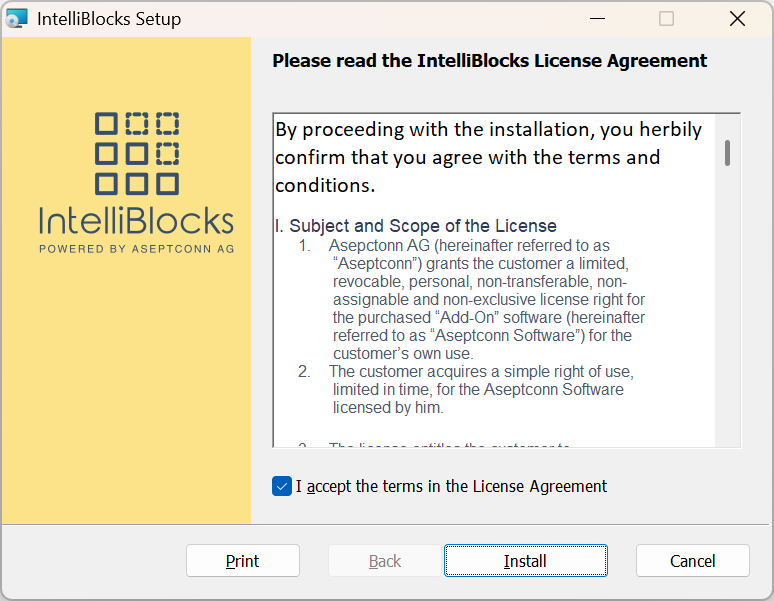
Review the license agreement, then click Install to continue
-
Wait for the installation to complete.
-
Click Finish once the process is done.
-
-
Verify Installation
-
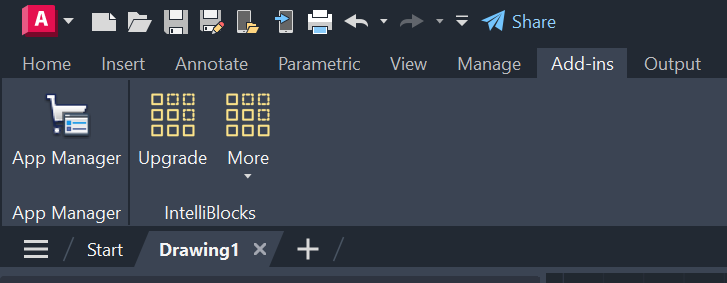
Launch AutoCAD and ensure that IntelliBlocks® is visible in the Add-ins panel:
-
Uninstallation Instructions
To uninstall IntelliBlocks®, follow these steps:
-
Open Windows Apps Settings
-
Press
Win + Ito open the Settings app. -
Navigate to Apps > Apps & features.
-
-
Locate IntelliBlocks®
-
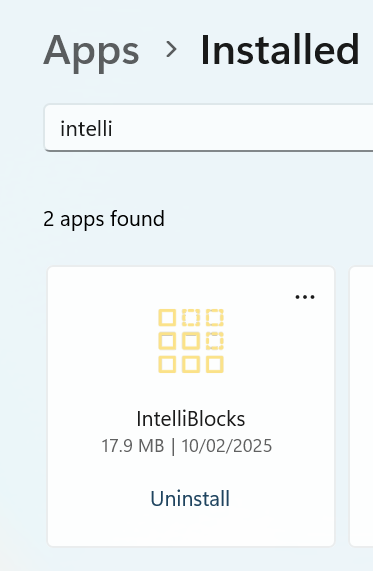
In the list of installed applications, search for "IntelliBlocks".
-
Click on the entry for IntelliBlocks.
-
-
Uninstall the Application
-
Click the Uninstall button.
-
Confirm your choice if prompted.
-
Follow any additional on-screen instructions to complete the uninstallation.
-